The best app for drone pilots: what it should do, and what Terasor does
Most drone apps do one job well. One flies the aircraft, one logs your flights, one shows you the airspace. If you fly for money, though, the job is bigger than the flight. You have to find the work, price it, get paid, plan around the weather, deliver the footage and keep enough of your work online that the next client trusts you.
So when pilots search for the best app for drone pilots, the real answer depends on what you need it for. This guide sets out what a working pilot needs from an app, then shows what Terasor does for each part, and what it doesn't do. Everything here is correct as of October 2026.
What a working drone pilot needs from an app
Six things come up again and again:
- A steady way to find paid work near you.
- Payment that's clear before you fly, and arrives after you deliver.
- A way to take bookings from your own clients, not just the platform's.
- Weather and airspace checks for the place and the aircraft you're actually flying.
- Somewhere to show your work so clients can judge it.
- Other pilots to ask when you're unsure.
No app replaces your drone manufacturer's flight app, and none should. But the business side of drone work, the part that pays the bills, can live in one place. That's what Terasor is built for.
1. Finding paid work near you
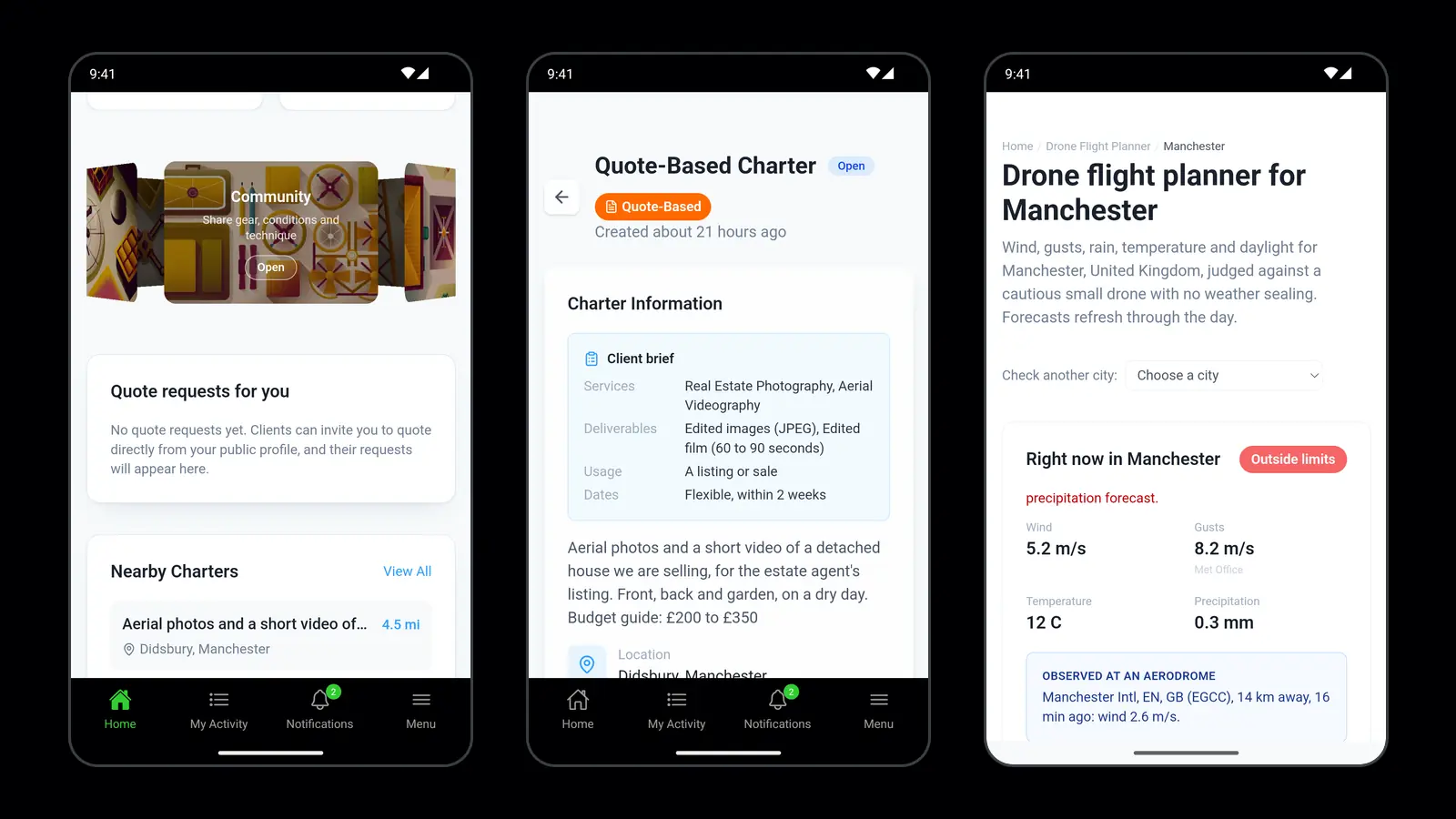
Clients post charters on Terasor: the job, the place and when they need it. You choose how far you're willing to travel, and Terasor shows you the charters within that distance. The app sends a notification when a new charter appears near you, so you don't have to keep checking.
There are three ways a client can book:
- Quote-Based: the client describes the job, pilots send quotes, and the client chooses one.
- Fixed-Price: the client sets the budget up front, and pilots deliver at that price.
- Live-Stream: the client watches the flight live, with the recording included.
You can see what's open now on the drone pilot jobs page.
2. Getting paid
Payment is where many pilots get burned, so it's worth being exact.
- Clients pay by card through Stripe. On a Quote-Based charter, the client's card is authorised when they accept your quote, and it is charged 24 hours before the flight.
- You're paid after the work is delivered and approved, or the review period ends without a dispute. The money goes to your connected Stripe account.
- Terasor keeps 10% of completed work. You keep 90%, before card and Stripe fees. Clients pay no platform fee on top of the charter price.
- Joining is free, and there's no monthly fee.
The full breakdown is on the pricing page.
3. Taking bookings from your own clients
A lot of your best work will come from people who already know you. My Offers lets you set up your own fixed-price packages, such as a property shoot or a roof inspection, and share them with a link or a QR code. Your client pays by card without having to create an account. Terasor keeps 10% of the price, the same as on charters, and the booking sits alongside the rest of your work.
There's a step-by-step guide in how to take a booking from your own clients.
4. Planning flights: weather and airspace
Flight Window reads the forecast for where you'll fly: wind, gusts, rain, temperature and daylight, hour by hour, judged against the manufacturer's figures for your drone. Rather than a general "good flying weather" score, you see whether your aircraft is within its limits at the time you plan to fly.
The public flight planner also covers a growing list of cities, each with a weather verdict and the published airspace restrictions for that area. Airspace data currently covers the UK, the US and Spain.
A planner helps you decide whether a job is worth taking and when to fly it. On the day, your country's official airspace sources and your own pre-flight checks remain the final word.
5. Showing your work
Clients hire the pilot whose work they can see. Terasor gives you several ways to show it:
- A public pilot page in the pilot directory, showing your work, your equipment and the area you cover.
- Explore, where you can share videos, 360 panoramas and stills.
- 3D World, which turns one flight into a 3D scene anyone can explore in the browser. See how to turn a drone flight into a 3D scene.
- Live streams to a public page, so people can watch a flight as it happens. If you fly with DJI Fly, this guide covers custom RTMP setup.
- Stock footage: list clips you've already shot in the stock library.
6. Delivering the job from your phone
When the flight is done, you can upload the deliverables straight from your phone. The client previews and downloads the footage, then approves it or reports a problem. That approval, or the end of the review period, is what releases your payment.
7. Other pilots
The Terasor community is where pilots talk kit, permissions, pricing and conditions. If you have a question about a job, a drone or an awkward site, someone has usually been there before.
The app and the website
The Terasor app for Android is now on Google Play. It does everything terasor.com does, with the same account, so you can start on your laptop and finish on your phone. There's no iPhone app yet; on an iPhone, terasor.com works in the browser.
What Terasor doesn't do
It's worth being clear about the limits:
- It doesn't fly your drone. Keep using your manufacturer's app for flying, camera settings and flight logs.
- It doesn't replace your registration or permissions. What you need depends on your country, your drone and the job. Our drone laws pages are a starting point, and your aviation authority has the final word.
- Airspace data covers three countries for now: the UK, the US and Spain.
- It's a young marketplace. How much work you'll see depends on where you are, and it grows as more clients post charters. With My Offers you don't have to wait: you can bring your own clients from day one.
So, is Terasor the best app for drone pilots?
If you fly for work and want finding jobs, getting paid, planning flights and showing your work in one place, that's exactly what Terasor is built for. If you only fly for fun, your manufacturer's app and an airspace checker may be all you need, though Flight Window and the community are free either way.
How to get started
- Create a free account and choose pilot.
- Add your drone, so Flight Window can judge the weather against it, and set the area you cover.
- Connect Stripe, so you can be paid.
- Fill in your public pilot page with your best work.
- Set up one offer you can send to an existing client today.
Frequently asked questions
Is Terasor free for drone pilots? Yes. Joining is free and there's no monthly fee. Terasor keeps 10% of completed work.
When do I get paid? After the work is delivered and approved, or the review period ends without a dispute. The payment goes to your connected Stripe account.
Do clients pay a fee on top? No. Clients pay the charter price with no platform fee added.
Is there a Terasor app for iPhone? Not yet. The Android app is on Google Play, and on an iPhone you can use terasor.com in the browser with the same account.
Can I use Terasor outside the UK? Yes. The marketplace isn't limited to the UK. Payouts go through Stripe, so you need to be somewhere Stripe can pay you out. The flight planner's airspace data covers the UK, the US and Spain.
Does Terasor check the weather for my drone? Yes. Flight Window judges wind, gusts, rain, temperature and daylight against the manufacturer's figures for the drone on your profile.
Terasor Team
Notes on drone regulation, equipment and the working side of aerial services, for the people who fly and the people who hire them. Terasor is a platform for professional drone services and aerial content.